Spreadsheet Calculation and Document Processing in JavaFX — Lessons from SCell, forumSTAR-Text and bk.text
Table of Contents
Notes from Vasily Smeltsov’s talk at the JFX Adopters Meeting 2026, Munich, 16 June.
Why a JavaFX spreadsheet component had to exist
Every Java team that has ever needed an editable spreadsheet inside their own application has asked the same question: why does this not exist in JavaFX?
We asked it too. The available answers weren’t answers:
Apache POI — Backend only. Read/write XLSX, no UI. You build the editor on top.
GemBox / DsExcel / Aspose — Commercial, but also backend-only Excel APIs. No JavaFX UI.
ControlsFX SpreadsheetView — A JavaFX grid widget. No formula engine, no XLSX round-trip.
A web component in a WebView — Foreign tech stack, licensing, performance, look-and-feel mismatch.
Build it yourself — Months. Then more months for formula compatibility.
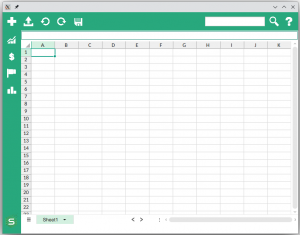
So we built one. In JavaFX. With 400+ Excel-compatible formulas, an MVVM architecture, and a single codebase that runs from JavaFX 8 to 21. That’s SCell.
Build it once, run it everywhere
The architectural bet paid off. Four numbers say most of it:
400+ Excel formulas — including financial, statistical, and lookup functions
JavaFX 8 → 21 on the same codebase
MVVM for clean separation of view and business logic
XLSX full round-trip — open, edit, save, PDF, CSV
The lesson underneath: spreadsheet semantics — formulas, ranges, dependencies, recalculation — belong behind a clean abstraction. JavaFX is just the view. Get that boundary right and porting between JavaFX versions, or between desktop and web, becomes an engineering task, not a rewrite.
Accessibility: the openfx-uia lesson
One of the hardest problems we solved wasn’t formula math. It was accessibility.
For bk.text — a next-generation text system for the German judiciary — we needed to expose a Word-class rich-text document to screen readers and Braille displays over Windows UI Automation: pages, paragraphs, text runs, character attributes.
Stock JavaFX accessibility covers standard controls: roles, descriptions, accessible text. On Windows there’s TextPattern support for basic text controls. But there is no built-in Word-like model for paginated rich text.
The gap got closed by the community. BestSolution.at built openfx-uia, an open-source JavaFX UIA layer that hooks into JavaFX accessibility and exposes ITextProvider, ITextRangeProvider and ITextEditProvider. We used it in bk.text to expose real document semantics to judiciary users who rely on assistive technology.
See the bk.text showcase on JFX Central.
If you need accessible JavaFX on Windows for anything more than trivial text: start with openfx-uia.
Putting JavaFX inside Swing — and shipping it
forumSTAR-Text is a legacy Swing word-processing system used in German justice environments in eleven federal states. It runs in production every day. When our users needed to work with Excel and CSV data inside that Swing application, we didn’t rewrite the host. We embedded SCell.
The stack: forumSTAR-Text (Swing) → JFXPanel → SCell (JavaFX).
That’s the easy diagram. The hard part is what you have to get right to make it survive a working day of judicial editing:
Threading — the Swing EDT and the JavaFX Application Thread are not friends. You have to marshal every cross-boundary call.
Focus — keyboard focus across the Swing / JavaFX boundary is the silent killer. Users notice immediately when it breaks.
Memory — long-running judiciary sessions tolerate zero leaks.
DPI and high contrast — Swing host and JavaFX child are two scaling worlds. They have to agree.
Get those right and you can modernize a Swing system incrementally, without asking anyone for a big-bang rewrite.
You are currently viewing a placeholder content from YouTube. To access the actual content, click the button below. Please note that doing so will share data with third-party providers.
Demo: SCell in forumSTAR-Text — importing data from Excel and CSV inside a Swing host application.
Desktop and web from one codebase — with JPro
The same SCell binary runs in the browser. Same 400+ formulas, same MVVM, no separate web build. That’s JPro from Sandec, rendering the JavaFX scene into the browser server-side.
What we learned running it:
Cell-rendering performance is fine, even with large sheets.
Clipboard semantics differ between desktop and browser — needs handling.
Right-click menus need explicit web-side wiring.
Server-side mode is the killer feature for our enterprise customers — the file never leaves their infrastructure.
You can try the live demo on our SCell Web page — powered by JPro.
Four very different hosts, one component
Because we built the abstraction correctly, the same JavaFX component ships in radically different host applications:
Polarion ALM — Eclipse RCP / SWT (Siemens · ALM) — Sold · on marketplace
forumSTAR-Text — Swing (Justice · 11 federal states) — Sold · in production
SAP S/4HANA — Desktop + Web (Enterprise ERP) — Proof of Concept
Eclipse RCP/SWT, Swing, native JavaFX, and enterprise ERP — same spreadsheet engine. That’s the return on getting the abstraction right.
You are currently viewing a placeholder content from YouTube. To access the actual content, click the button below. Please note that doing so will share data with third-party providers.
You are currently viewing a placeholder content from YouTube. To access the actual content, click the button below. Please note that doing so will share data with third-party providers.
SCell integrated with SAP S/4HANA — Proof of Concept, desktop and web.
Bonus: comparing two XLSX files, cell by cell
Excel has no native diff tool. Visual comparison in the Microsoft world requires Spreadsheet Compare — enterprise-only, and outside most users’ entitlements.
We built visual XLSX comparison directly into SCell. Two files side by side, cell-by-cell differences in data, formulas and styles, highlighted in the same familiar spreadsheet view. If your users work in regulated environments where every change needs to be auditable, this alone is a reason to look.
You are currently viewing a placeholder content from YouTube. To access the actual content, click the button below. Please note that doing so will share data with third-party providers.
Visual Excel file comparison with SCell — simple and intuitive.
Three take-aways
1. JavaFX is production-ready for complex domain components.
400+ formulas, MVVM, one codebase from JavaFX 8 to 21. The platform delivers.
2. Swing-to-JavaFX bridges work — with discipline.
Threading, focus, lifecycle, DPI. Get them right and you can modernize Swing systems incrementally, without a big-bang rewrite.
3. Stand on the shoulders of the community.openfx-uia by BestSolution.at. JPro by Sandec. QF-Test by Quality First Software. JFX Central. Use these tools, credit them, contribute back.
A small gift: SCell.Reader for IntelliJ IDEA
A free plugin. Read XLSX files inside your IDE — same SCell engine that runs in Polarion, forumSTAR-Text and SAP PoCs. Ten seconds to install.
Get it on the JetBrains Marketplace.
Let’s talk
Anything from the talk resonate?
You want SCell inside your application — desktop or web
You have a Swing application and want JavaFX components inside
Your users need to compare spreadsheet versions
You need accessible JavaFX on Windows
Get in touch: scalable-components.com/contact — or ask about a technical demo tailored to your host application.
Build smart. Ship more. Trust the community.
You are currently viewing a placeholder content from Vimeo. To access the actual content, click the button below. Please note that doing so will share data with third-party providers.
You are currently viewing a placeholder content from YouTube. To access the actual content, click the button below. Please note that doing so will share data with third-party providers.
You are currently viewing a placeholder content from Vimeo. To access the actual content, click the button below. Please note that doing so will share data with third-party providers.
You are currently viewing a placeholder content from YouTube. To access the actual content, click the button below. Please note that doing so will share data with third-party providers.
You are currently viewing a placeholder content from Bunny Stream. To access the actual content, click the button below. Please note that doing so will share data with third-party providers.
You are currently viewing a placeholder content from Wistia. To access the actual content, click the button below. Please note that doing so will share data with third-party providers.
You are currently viewing a placeholder content from reCAPTCHA. To access the actual content, click the button below. Please note that doing so will share data with third-party providers.